
How to Change the PHP Version on Your Domain in cPanel Print


Some software requires a different version of PHP. You can switch the PHP versions using cPanel.


1. Log in to your cPanel account.


2. In the Software section, click on MultiPHP Manager.

cpanel-multiphp-icon.gif

3. Scroll down to the bottom of the page. Select your domain from the left side of the screen. You can view the PHP Version from the drop-down menu on the right. Please, select the appropriate PHP version from it and click on Apply.
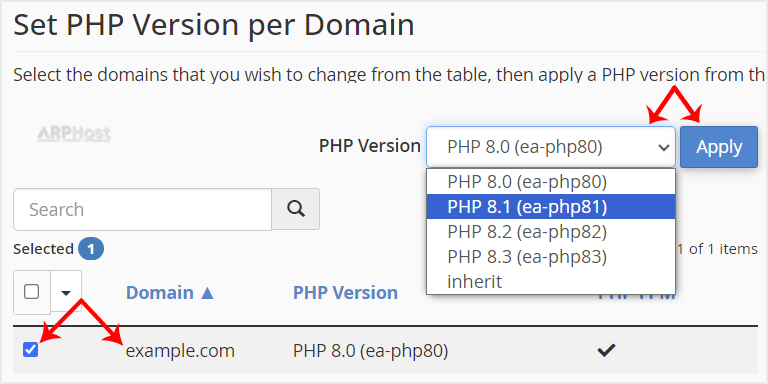
cpanel-multiphp-select-domain-full.gif


Changing the PHP version to your selected version takes a few seconds.


Was this answer helpful?

Related Articles

How to Reset cPanel's Account Password If you have access to your cPanel account, follow these steps to reset your password: 1. Log in... How to Update cPanel Contact Information and Receive Resource Limit Notifications If you want to receive a notification on reaching your disk quota, bandwidth usage limit or wish... How to Change cPanel's Style/Theme Switching over to another cPanel theme with a different style is easy.1. Log in to your cPanel... How to Change the Language of Your cPanel Account cPanel supports many languages. If you want to change your cPanel language to a native one, you... How to Upload Files via the cPanel File Manager You can use cPanel's built-in file manager instead of an FTP program to manage your website...
« Back