
How to Remove a Domain Redirect in cPanel Print


If a domain redirect is no longer needed, you can easily remove it in cPanel. This ensures visitors access the original website instead of being redirected elsewhere.

1. Log in to your cPanel account.


2. In the Domains section, click on Redirects.


3. Scroll down to the end of the page. Under Current Redirects, locate the domain and click on remove.
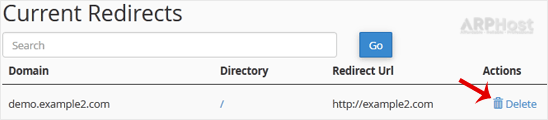


4. For confirmation, click on Remove Redirect once more.

You have removed the domain redirect in cPanel.


Was this answer helpful?

Related Articles

How to Create an Alias or Park a Domain in cPanel An Alias domain, formerly known as a parked domain, lets you create a mirror of your primary... How to Remove Parked Domains/Aliases in cPanel Parked domains, also known as aliases, are additional domains that point to your main website. If... How to Create Addon Domains in cPanel Before adding the addon domain, point your addon domain nameservers to your primary domain... How to Remove an Add-on Domain in cPanel If you no longer need an add-on domain in cPanel, you can remove it easily to free up space and... How to Redirect an Add-on Domain in cPanel You can redirect your add-on domain to another domain.1. Log in to your cPanel account. 2. In...
« Back